Common Mistakes to Avoid When Designing Bottle Labels
Bottle labels do more than show a product name. They help customers recognize your brand, understand your product, and decide whether to buy it. A well-designed label can improve shelf appeal and build trust, while a poor design can confuse buyers or make your product look unprofessional.
Whether you are creating labels for beverages, cosmetics, supplements, sauces, or cleaning products, avoiding common bottle label design mistakes can save time, reduce printing costs, and improve product sales.
In this guide, you will learn the most common bottle label design mistakes and how to avoid them when creating custom bottle labels for your packaging.
Why Bottle Label Design Matters
Your bottle label is often the first thing customers notice. In crowded retail stores and online marketplaces, your packaging must stand out quickly.
Good bottle label design helps:
Improve brand recognition
Communicate product information clearly
Increase customer trust
Support compliance requirements
Create a premium product image
Encourage purchasing decisions
Poor label design, however, can lead to printing problems, weak branding, or customer confusion.
Mistake #1: Using Too Much Text
One of the biggest mistakes in bottle label design is overcrowding the label with information.
Customers usually scan packaging within seconds. If the label contains too many words, small paragraphs, or unnecessary details, people may ignore it completely.
How to Avoid It
Focus on the most important information:
Brand name
Product name
Key benefits
Required legal information
Contact or website details
Use short phrases and simple language. White space is important because it makes the design easier to read.
Mistake #2: Choosing Fonts That Are Hard to Read
Fancy fonts may look creative on screen, but they often become difficult to read after printing, especially on small bottle labels.
Unreadable typography can hurt customer trust and make your product appear unprofessional.
Common Font Problems
Fonts that are too small
Overly decorative styles
Poor contrast between text and background
Using too many font styles together
How to Avoid It
Use clean, professional fonts with clear spacing. Limit your design to two or three font styles at most.
For example:
One font for headings
One font for body text
Optional accent font for highlights
Always test readability before mass printing.
Mistake #3: Ignoring Label Material and Finish
Many businesses design labels without considering the final printing material.
A design that looks great on a computer may look completely different on glossy, matte, transparent, or waterproof label materials.
Why Material Matters
Different materials affect:
Color appearance
Durability
Texture
Water resistance
Outdoor performance
For example, beverage bottle labels often need waterproof materials because of condensation and refrigeration.
How to Avoid It
Choose the label material before finalizing the design. Discuss options with your label printing supplier, including:
Matte labels
Glossy labels
BOPP waterproof labels
Clear labels
Textured paper labels
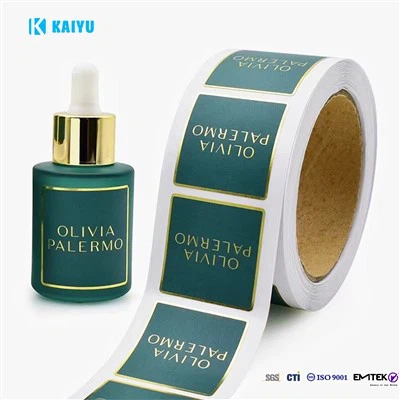
Also consider special finishes like lamination, UV coating, or foil stamping.
Mistake #4: Poor Color Choices
Colors strongly influence customer emotions and purchasing behavior. However, poor color combinations can damage readability and brand identity.
Common Color Mistakes
Low contrast text
Too many bright colors
Colors inconsistent with brand identity
Ignoring print color differences
For example, neon colors may appear dull after printing if the printer settings are not correct.
How to Avoid It
Use a limited and balanced color palette. Make sure text contrasts clearly with the background.
It is also important to request printed samples before large production runs.
Mistake #5: Forgetting About Bottle Shape and Size
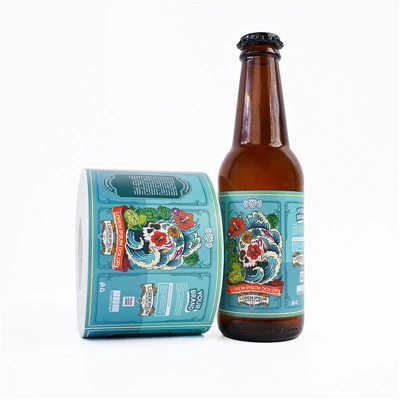
Bottle labels are not flat posters. Curved surfaces can distort text, logos, and images.
A design that fits one bottle size may not work on another shape.
Common Problems
Labels wrinkling during application
Important text wrapping around curves
Poor alignment
Incorrect label dimensions
How to Avoid It
Measure the bottle carefully before designing the label.
Always account for:
Label height and width
Curved areas
Application space
Bleed and safe margins
Testing a physical sample on the actual bottle is highly recommended.
Mistake #6: Using Low-Resolution Images
Blurry images and pixelated logos are common printing problems.
Images copied from websites or screenshots often do not have enough resolution for professional label printing.
How to Avoid It
Use high-resolution graphics, preferably:
300 DPI images
Vector logos
Professional product photography
This helps ensure sharp and clean print quality.
Mistake #7: Not Following Compliance Requirements
Different industries have strict labeling rules. Missing information can lead to legal issues or product rejection.
Industries with Important Labeling Requirements
Food and beverage
Cosmetics
Supplements
Chemicals
Pharmaceuticals
Common Missing Information
Ingredient lists
Expiration dates
Barcodes
Safety warnings
Country of origin
Batch numbers
How to Avoid It
Research labeling regulations in your target market before printing. Leave enough space in the design for mandatory information.
Mistake #8: Designing Without Brand Consistency
Your bottle label should match your overall brand identity.
If every product uses different colors, fonts, or styles, customers may struggle to recognize your brand.
How to Avoid It
Create brand guidelines that include:
Brand colors
Typography
Logo placement
Packaging style
Image style
Consistent packaging helps build customer trust over time.
Mistake #9: Skipping Print Testing
Many design problems only appear after printing.
Colors, alignment, readability, and material performance may differ from digital previews.
How to Avoid It
Always request:
Printed proofs
Material samples
Test applications on bottles
Testing helps catch expensive mistakes before full production.
Best Practices for Effective Bottle Label Design
Here are some quick best practices to improve your custom bottle labels:
Keep the Design Simple
Clean layouts are easier to read and more visually attractive.
Prioritize Readability
Customers should quickly understand what the product is.
Match the Label to the Product
Luxury products may need elegant finishes, while natural products may work better with matte or textured materials.
Use Durable Materials
Choose waterproof or oil-resistant labels when needed.
Work With Experienced Label Printers
Professional printing suppliers can help optimize designs for better results.
Final Thoughts
Designing bottle labels is not only about appearance. It also involves functionality, branding, readability, and print performance.
By avoiding common bottle label design mistakes, businesses can create packaging that looks professional, attracts customers, and performs well during production and use.
Whether you are launching a new beverage, cosmetic product, or food item, investing time in smart label design can improve both brand image and customer experience.
FAQ About Bottle Label Design
1. What is the most common mistake in bottle label design?
The most common mistake is overcrowding the label with too much text and visual information. Simple and clear designs usually perform better.
2. What resolution should images be for bottle label printing?
Images should typically be at least 300 DPI for high-quality printing results.
3. What is the best material for waterproof bottle labels?
BOPP labels with lamination are commonly used for waterproof bottle labels because they resist moisture and refrigeration conditions.
4. How do I choose the right size for a bottle label?
Measure the bottle carefully, including curved areas and application space. Testing printed samples on the actual bottle is recommended.
5. Why do printed label colors look different from screen colors?
Digital screens use RGB colors, while printers use CMYK. This difference can affect the final printed appearance.
6. Should I use matte or glossy bottle labels?
Matte labels create a soft and premium appearance, while glossy labels offer brighter colors and stronger shine. The best option depends on your brand style and product type.
7. How can custom bottle labels improve product sales?
Well-designed custom bottle labels improve shelf appeal, strengthen branding, and help customers quickly understand the product, which can increase purchase decisions